Direct RDP/SMB Channel PC to PC
A direct, lightweight, peer-to-peer Remote Desktop and File Sharing channel. No intermediaries, no servers - your PC is the service.
Download for Windows Version 0.57.1 | 35.6 MB | Free & Open Source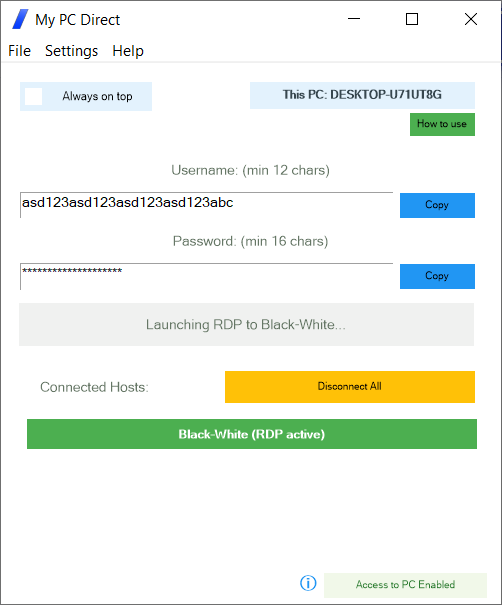
A direct, lightweight, peer-to-peer Remote Desktop and File Sharing channel. No intermediaries, no servers - your PC is the service.
Download for Windows Version 0.57.1 | 35.6 MB | Free & Open Source
All core features will remain free. Your PC already has the internet connectivity needed. No third parties involved.
True peer-to-peer connectivity. No servers, no intermediaries, no third parties involved in establishing your connection.
Self-reliant by design. Your PC provides the service directly—no dependency on corporations, external services, or third-party providers.
End-to-end encryption with no third parties to monitor, intercept, or record your communications. No keystroke logging. No rogue intermediaries.
Small download, runs instantly. No admin rights required. Works in most connectivity scenarios including over VPNs.
Access your home PC via the internet—no port forwarding or router configuration needed. Modern P2P techniques handle the connectivity.
Always free for basic connectivity. Your PC already has the internet capability—you shouldn't need to pay or rely on anyone else.
Get connected in just a few simple steps
Create new credentials by typing in a user name of your choice (12 or more characters—could be an email, not shared with anyone) and a password of your choice (16 characters or more).
Click "Save and Connect", which will join the PC to the network of peers.
Install 'My PC Direct' on additional computers and use the same credentials to connect. Your PCs will locate each other and create a direct, encrypted connectivity channel between them.
My PC Direct uses modern peer-to-peer (P2P) technology to establish direct connections between your computers. Unlike traditional remote desktop solutions that route traffic through third-party servers, your data travels directly from one PC to another. This means faster connections, lower latency, and complete privacy—no corporation or service provider can see your screen or keystrokes.
Your credentials (username and password) serve as your private network identifier. Only PCs using the exact same credentials can discover and connect to each other. The longer and more unique your credentials, the more resilience is afforded—hence the minimum length that the application requires is 12 characters for the username and 16 characters for the password.
However, these credentials provide access to the first layer only—the encrypted peer-to-peer channel between your PCs. To actually log into your computer, you still need to enter your standard Windows/RDP credentials (your Windows username and password). This means even if someone discovered your My PC Direct credentials, they would still face your normal Windows login screen and cannot access your computer without those separate credentials. It's two layers of security working together.
Traditional remote desktop setups often require complex router configuration and port forwarding. My PC Direct uses NAT traversal techniques to punch through firewalls and routers automatically. This means you can connect to your home PC from anywhere—whether you're at a coffee shop, office, or traveling abroad—without touching your router settings.
Your RDP sessions will be shown starting with localhost:port# (for example, localhost:52847). This means your RDP service is never exposed externally—it runs on a different, randomly chosen local port instead of the standard RDP port.
Here's how it works: when you choose to establish a new RDP session, your PC sends the request to this randomly assigned local port. That local port then forwards the request through the encrypted peer-to-peer channel that has already been established between your PCs, delivering it to the remote PC's RDP service on the other end.
This design provides an additional layer of security. Your actual RDP port is never opened to the internet or exposed to external networks. The only way to reach it is through the encrypted P2P tunnel—which itself requires your unique credentials to establish. External port scanners and attackers cannot see or access your RDP service because it simply isn't listening on any externally reachable port.
All communications between your PCs are encrypted end-to-end using your credentials as the encryption key foundation. This means that even if someone intercepts your network traffic, they cannot decrypt or view your data. Your screen content, keystrokes, and file transfers remain completely private between your connected devices.
The encryption happens at the source (your PC) and is only decrypted at the destination (your other PC). No intermediate server, internet provider, or any third party ever has access to the unencrypted data. The encryption keys are derived from your unique credentials and are never transmitted over the network—they exist only on your devices. This is fundamentally different from services that encrypt "in transit" but decrypt on their servers.
DHT stands for Distributed Hash Table—a decentralized system that allows your PCs to find each other without relying on a central server. Think of it as a giant, shared address book distributed across thousands of computers worldwide, where no single entity owns or controls it.
When your PC connects with your credentials, it publishes a small, encrypted "announcement" to the DHT network saying "I'm online and reachable at this address." Your other PCs, using the same credentials, can look up this announcement and discover where to connect. The DHT only stores connection metadata (IP addresses)—never your actual data or screen content. Once your PCs find each other through the DHT, they establish a direct connection and all communication bypasses the DHT entirely.
Popular applications like BitTorrent and various cryptocurrency networks use DHT technology. It's battle-tested, resilient, and cannot be shut down because there's no central point of failure.
Traditional remote desktop solutions (like TeamViewer, AnyDesk, or cloud-based RDP) route your connection through their corporate servers. This means: they can see your traffic, they can be compelled to hand over data, they can shut down your access, and they can charge subscription fees for what is essentially your own internet bandwidth.
My PC Direct is fundamentally different. Once your PCs discover each other through the decentralized DHT network, they connect directly—your data flows straight from one PC to another over the internet you already pay for. No corporate server sits in the middle. No company stores your session data. No third party can monitor, throttle, or monetize your connection.
Your PC already has everything it needs: an internet connection and processing power. Why pay a corporation to relay data between two computers you own? My PC Direct simply enables your PCs to find and talk to each other directly—the way the internet was originally designed to work.
When you use My PC Direct, you're not a customer dependent on a company's continued existence or goodwill. You're not subject to changing terms of service, price increases, or service discontinuation. Your ability to connect to your own computers doesn't depend on any corporation's business decisions.
The peer-to-peer network is maintained by all participants equally—including you. By running My PC Direct, your PC becomes part of the infrastructure that helps others discover their devices, just as their PCs help you. It's a cooperative model where everyone contributes and everyone benefits, with no central authority extracting value or control.
My PC Direct is designed with privacy as a core principle. Here's what is never shared with anyone:
Even if you fully trust a company that provides remote connectivity services, that trust doesn't eliminate the technical risks inherent in their architecture. Here's why:
Remote desktop companies are high-value targets for sophisticated hacker groups. A successful breach gives attackers access to all customer connections simultaneously. History shows that even well-funded security teams at major corporations get breached. When a remote desktop provider is compromised, attackers gain the technical ability to monitor every keystroke, capture screenshots, view screen contents in real-time, intercept file transfers, and access any private documents—financial records, personal communications, business secrets—anything displayed or transferred through that service.
Every company has employees with privileged access to systems. A disgruntled employee, someone facing financial pressure, or simply a bad actor who slipped through hiring can abuse their access. They could monitor your sessions, capture sensitive data, or sell access to criminals—all without the company's knowledge. Internal threats are notoriously difficult to detect, and by the time they're discovered, the damage is done.
Most remote desktop providers don't own their infrastructure—they rent servers in third-party data centers operated by yet another company. This means employees at those data centers may have physical or administrative access to the servers processing your data. Your trust in the remote desktop company doesn't extend to the data center staff, their contractors, their cleaning crews, or anyone else with facility access.
When your data passes through a company's servers, they have the technical capability to access it—regardless of their policies or promises. If they provide you with a service that they control, then so can anyone who compromises their systems. This isn't about whether a company would spy on you; it's about whether they could—and whether attackers who breach them could.
My PC Direct eliminates these risks by removing the middleman entirely. Your data never touches a corporate server, data center, or third-party service infrastructure. The connection goes directly from your PC to your other PC—encrypted end-to-end with keys that exist only on your devices. There's no server to hack, no employees with access to your sessions, no data center staff who could intercept your traffic. Even if someone wanted to monitor your connection, they physically couldn't—the infrastructure to do so simply doesn't exist in this architecture.
Captured inputs:
Transferred data:
Sensitive information visible on screen: